Let’s be honest. You’re here because you’ve seen the potential. Personalized gifts, high-margin custom decor, branded corporate swag—laser-engraved wood sells. But between the dream and the finished product lies a minefield of botched jobs, charred edges, and inconsistent suppliers that eat into your profits and sanity. I get it. The frustration is real when a great idea gets reduced to a smoky paperweight. What if you could master this process and unlock a consistently profitable product line?
The secret to flawless laser engraving on wood isn’t just about the machine; it’s about understanding the marriage between your material, your settings, and your design. Get this trio right, and you’ll produce stunning, sellable pieces every time.
Stick with me, and I’ll walk you through the entire process, from choosing the right plank to packing a perfect finished product. No more guesswork, just clear, actionable steps that you can trust for your business.

Why Laser Engraving Wood is a Business Game-Changer
Look, in the world of physical products, finding a niche that blends customization, quality, and solid margins can feel like searching for a unicorn. Laser engraving on wood is pretty close to that mythical creature.
It lets you transform a simple, natural material into something of immense perceived value. And that, my friend, is where the money is.
From Personalized Gifts to Bulk Corporate Orders
The market is vast. On one end, you have heartfelt, one-off gifts—wedding plaques, anniversary maps, personalized name signs. On the other, you have scalable B2B orders: laser-engraved corporate logos on walnut desk sets, branded promotional items for trade shows, custom components for high-end furniture. One machine, countless applications.
The Profit Margin Sweet Spot You’ve Been Hunting
Here’s the kicker. The raw material cost (the wood blank) is often low. The value you add through precise, custom engraving is high. That gap is your profit playground. When you control the process and have a reliable, affordable source for your blanks, those margins get even sweeter.
Laser Engraving 101: It’s Not Magic, It’s Controlled Burning
Forget complicated physics. Think of a laser as a super-concentrated beam of light energy, like a magnifying glass focusing sunlight to a tiny, hot point. But way more precise, and controlled by a computer.
How Does a CO2 Laser Actually Work on Wood?
A CO2 laser (the most common type for woodworking) vaporizes the material it touches. It doesn’t cut with friction like a blade; it instantly turns the top layers of wood into gas and smoke. By moving this pinpoint beam across the surface, you trace your design, removing material to create a permanent indentation or contrast. The science is cool, but the results are what matter.
Key Terms You Need to Know: Speed, Power, and DPI
These are your three main levers. Speed (mm/s or in/s) is how fast the laser head moves. Power (%) is the intensity of the beam. DPI (Dots Per Inch) controls the resolution—more dots closer together means a finer, smoother image.
Play with these like a sound engineer mixing a track. Too much power and high speed? A faint, scratchy line. Low speed and high power on thin wood? You might just cut right through it.

Your #1 Decision: Picking the Perfect Wood for the Job
Not all woods are created equal for laser work. Your choice here makes or breaks the final product.
The Top Contenders: Basswood, Maple, Cherry, and Walnut
For crisp, high-contrast engravings, you want light-colored, fine-grained hardwoods.
- Basswood/American Lime: My top recommendation for beginners. It’s soft, light, and engraves with a beautifully clean, contrasting mark. It’s forgiving and shows details brilliantly.
- Maple: Another fantastic choice. Denser than basswood, it gives a smoother, slightly lighter engraving but with exceptional detail.
- Cherry & Walnut: These are for when you want drama. They have stunning natural color. The engraving itself will be lighter than the surrounding rich wood, creating an elegant, subtle contrast.
Woods to Avoid (Unless You Like Firefighting)
Oily or resinous woods like pine, some cedars, or teak can be a nightmare. The resins vaporize unevenly, create more smoke, lead to messy burns, and are serious fire hazards in a laser. Just steer clear.
Plywood & MDF: The Budget-Friendly Pros and Cons
They’re cheap and readily available. But plywood has glue layers that can emit nasty fumes and engrave inconsistently. MDF engraves very smoothly but produces a lot of fine, messy dust and contains urea-formaldehyde adhesives—excellent ventilation is non-negotiable here. Know the risks.
Gearing Up: What You Really Need to Start
Choosing Your Laser (Desktop vs. Industrial)
For a small business, a desktop CO2 laser from a brand like Glowforge or OMTech is a great start. They’re relatively plug-and-play. When you’re running larger batches, you’ll eye up industrial-grade lasers—they’re faster, more durable, and have larger beds. The choice hinges on your volume.
The Non-Negotiable Safety Kit
This isn’t optional. You are creating smoke and fine particulates. You MUST have:
- A dedicated fume extraction system vented outside.
- A proper air assist (a stream of air at the laser point) to reduce flare-ups and clean the cut.
- Laser safety glasses specific to the CO2 laser wavelength (10.6µm). Your eyes are not replaceable.
Software Smarts: From Design File to Laser Command
You’ll work in two types of software. First, a graphic design program like Adobe Illustrator or CorelDRAW to create your vector or raster file. Then, you use a laser driver software (like LightBurn or RDWorks) that translates your design into commands for the laser, letting you set those crucial speed, power, and DPI settings.
The Pre-Flight Checklist: Prep Your Wood Like a Pro
Rushing prep work is the fastest way to ruin a perfectly good piece of wood.
Sanding and Cleaning: Don’t Skip This!
Start with a smooth, clean canvas. Sand your wood progressively (up to 220 grit is usually fine) to remove machine marks. Then, wipe it down with isopropyl alcohol or a damp cloth to remove every speck of dust. Any dirt left on the surface will get burned into the grain permanently.
Masking Up: Your Secret for a Pristine Finish
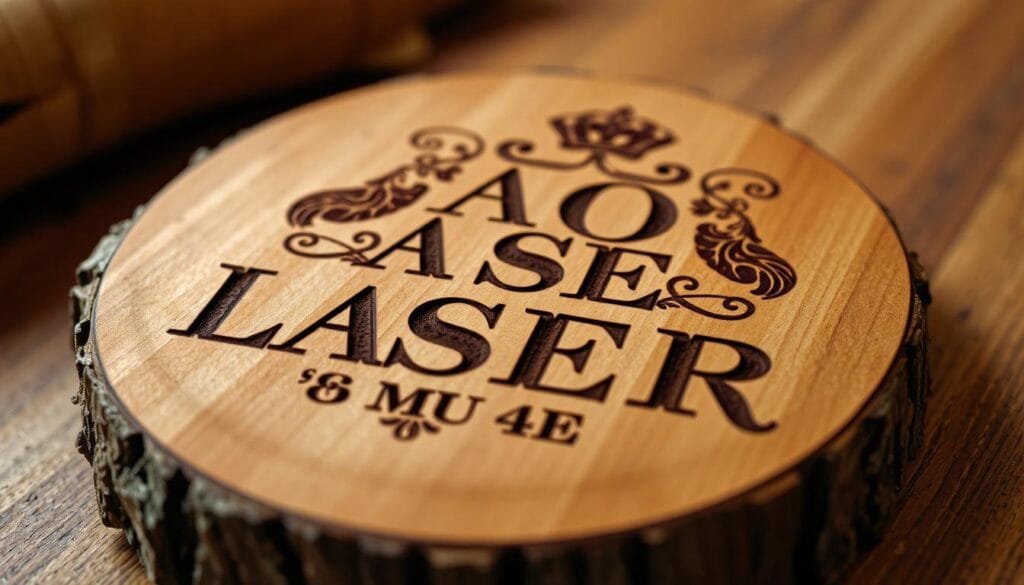
Applying a layer of application tape (like painter’s tape for lasers) over your wood is a game-changer. It protects the surface from smoke residue and scorch marks. After engraving, you peel it off to reveal a perfectly clean, contrasting engraving underneath. It saves you hours of post-processing cleanup.
Securing Your Workpiece: No Wobbly Engravings Allowed
Ensure your wood is perfectly flat and won’t move a micron during the job. Use the laser bed’s clamps, pins, or a honeycomb bed. A shifting piece mid-engrave is an instant scrap.
Dialing In: Finding Your Machine’s “Sweet Spot”
Every laser and every piece of wood is slightly different. Never trust generic settings you find online blindly.
The Power of Test Grids: Your New Best Friend
Before every important job, run a material test grid. This is a file that engraves a series of squares or lines at different speed and power combinations. It takes 5 minutes and tells you exactly what settings give you the perfect shade and depth on that specific piece of wood. It eliminates guesswork and waste.
Sample Settings for Common Woods (A Starting Point)
Remember: These are examples. Always do a test grid!
- Basswood (for dark engraving): Speed: 200 mm/s, Power: 25-30%, 500 DPI.
- Maple (for fine detail): Speed: 180 mm/s, Power: 30-35%, 500 DPI.
- Walnut (for subtle contrast): Speed: 250 mm/s, Power: 20%, 400 DPI.
Advanced Techniques to Make Your Products Pop
The Art of Multi-Pass Engraving for Depth
Want a deep, tactile engraving? Instead of cranking the power and risking a burn, run the same design multiple times at a moderate power setting (e.g., 2-3 passes at 20% power). This gradually removes material, creating cleaner, deeper grooves without the charring.
Achieving Stunning Contrast with Different Techniques
- Black Engraving: Standard technique on light wood. The laser carbonizes the surface.
- “White” Engraving: On darker woods like walnut, you just barely remove the top veneer to expose the lighter wood underneath.
- Paint-Fill: After engraving, rub acrylic paint into the grooves and wipe off the excess. It creates incredible, colorful pop. Great for logos.
Operation “Go Button”: Running Your Job Successfully
The Final Check: Focus, Ventilation, and Fire Safety
Triple-check your laser’s focus. Is the fume extractor ON and loud? Is your air assist on? Do you have a fire extinguisher within arm’s reach? Is your dedicated fume extraction system running? Good. Now you can press start.
What to Do While the Laser is Running (Hint: Watch!)
Never, ever leave a running laser unattended, especially on wood. Watch for the first 30 seconds. If you see a bright flare-up, pause immediately. A small, contained flame from a resin pocket can sometimes be blown out, but you need to be there to see it.
Post-Processing: From Smoky to Showroom Ready
Cleaning Off Residue and Masking
Once done, carefully peel off the application tape. For any remaining soot or residue, gently wipe the engraved area with a lint-free cloth dampened with isopropyl alcohol or a bit of water. For stubborn spots, a soft brush works wonders.
Finishing Touches: Oils, Waxes, and Sealants
This elevates your product. A light sanding with very fine grit (400+) can smooth the engraving. Then, apply a finish. Mineral oil is food-safe for cutting boards. Tung oil or Danish oil brings out the wood’s natural grain and protects it. For a durable, protective coat, use a spray lacquer or polyurethane.
Troubleshooting 101: Fixing Common Laser Engraving Issues
Why is My Engraving Too Faint or Too Dark?
- Too Faint: Increase power or decrease speed. The laser isn’t delivering enough energy.
- Too Dark/Charred: Decrease power or increase speed. You’re cooking the wood, not cleanly vaporizing it. Check your focus; a defocused beam spreads heat and scorches.
Banishing Unwanted Charring and “Tiger Stripes”
Horizontal charred lines (“tiger stripes”) are often from the laser head moving back and forth. Improve your air assist flow to blow away smoke before it stains. Ensure your ventilation is strong. Sometimes, slightly lowering the power helps.
The Business End: Turning Skills into Steady Revenue
You’ve mastered the craft. Now, let’s talk about scaling it without the headaches you usually face.
Sourcing Wood Reliably: Your Core Headache, Solved
This is where most small businesses get stuck. Sourcing consistent, high-quality, laser-ready wood blanks in sensible quantities. You don’t want to buy a container load, but you also can’t pay retail prices at the local hobby store. The answer is a supplier who gets it.
Low MOQ & High Customization: The Winning Combo
What you need is a partner who offers low Minimum Order Quantity but with full customization. Need 100 bamboo coasters, 50 maple business card holders, and 25 walnut jewelry boxes for a client order? Your supplier should say “no problem,” not “you must order 1000 of each.” This flexibility is how you stay profitable and agile.
Protecting Your Client’s Designs (And Your Reputation)
When a client sends you a proprietary logo or design, that trust is sacred. You need a supplier who respects that chain of confidentiality. A legitimate partner will gladly sign an NDA (Non-Disclosure Agreement) and treat your client’s IP with the same care you do. This isn’t just a service; it’s peace of mind.
Conclusion
Laser engraving wood is a powerful skill that bridges creativity and commerce. It starts with understanding your machine and material, but the real competitive edge comes from mastering the process—from a flawless test grid to a pristine finish. And the ultimate secret? Pairing that skill with a supply chain partner that’s as reliable, flexible, and quality-obsessed as you are. That’s how you turn a technical process into a thriving, stress-free business.
FAQs
1. How much does a good starter laser engraver cost?
You can get a capable desktop CO2 laser for small-batch production starting around $3,000 to $6,000. Remember to factor in the cost of ventilation, safety gear, and software.
2. Is laser-engraved wood durable? Will it fade?
The engraving is physically etched into the wood, so it won’t fade like ink. Its durability is the same as the wood surface itself. Applying a sealant (like polyurethane) protects it from moisture and UV, making it last for decades.
3. Can I laser engrave painted or stained wood?
Yes, and it can create fantastic effects! You can engrave through a top layer of paint to reveal the natural wood color beneath. Always test on a scrap piece first, as some paints/varnishes can emit harmful fumes.
4. What’s the biggest safety concern with laser engraving?
Fire and fumes. Never leave the machine unattended, always ensure proper ventilation to the outside, and have a fire extinguisher nearby. Also, never look at the laser beam without proper safety glasses.
5. I’m not artistic. Can I still create designs?
Absolutely. Many sellers use licensed vector graphics from stock sites, work with freelance designers, or offer engraving services based entirely on client-provided artwork (logos, photos, text). Your skill is in the execution and quality, not necessarily the original design.